New instruments / 7 November 2026
I wanted a synth I could drop onto a MIDI track and spend time getting to know. A few controls, several different ways of making a sound, and enough room for an experiment to become a patch worth keeping.
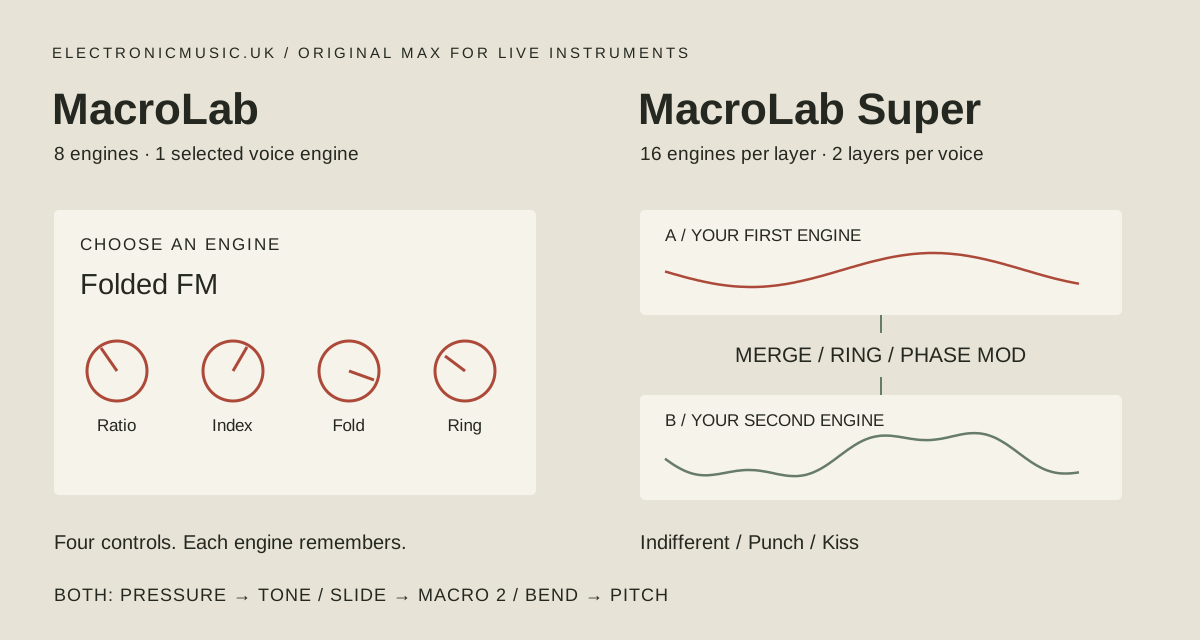
That became MacroLab, then MacroLab Super: a light and heavy pair of Max for Live instruments. One gives you eight original engines. The other puts sixteen engines on each of two layers, with ways to merge them, multiply them or let one disturb the other. Both now have per-note MPE and editable expression mappings.
MacroLab 0.1 + MacroLab Super 0.2 · MPE revision, 7 November 2026 · early access. Requires Ableton Live with Max for Live. Devices and guide included.
Why make another synth?
The starting point was the multi-model oscillator idea: choose a way of making a sound, then work with a small set of meaningful controls. Plaits was a reference for that approach. The attraction was the range of possible sounds inside one instrument, and how quickly a change in synthesis method could send a patch somewhere else.
I chose original engines for MacroLab. Folded FM, metallic strikes, harmonic shaping, vowel colours and glassy decays sit beside an oscillator stack and a pair of phase-distorted voices. Each engine keeps its own four settings when you switch away and return. You can follow a sound for a while, try another direction, then come back to where you left it.
In the first playing session I had sounds I hadn’t had before within five minutes. There is some menu diving, especially in Super. I like the pace that comes with it: slow, meaningful experimentation in a synth. Turn something, listen to what changed, and leave it alone long enough to hear the result.
A light one and a heavy one
MacroLab is the simpler instrument: one selected engine, four engine controls, an amplitude envelope, Tone, Drive, Spread and Output. It has eight-note polyphony and no internal chorus, delay or room effect. It is a useful place to learn the engines or build a sound before adding Live’s own effects.
MacroLab Super adds a second layer and eight more engines, including hard sync, a feedback string, chord clusters, divided bass and noise percussion. Each layer remembers its own engine settings. Two LFOs, a resonant tone stage, chorus, stereo echo and room give the patch somewhere to move.
The layers can simply Merge. Ring brings their multiplied signal into the mix. Phase Mod lets A alter the phase of B. Blend decides what you hear; Cross Mod sets the interaction depth. Small amounts can be enough.
Indifferent, Punch, Kiss
Super’s three character modes change the way the whole patch behaves. Indifferent uses the settings as they stand. Punch tightens the envelope, adds drive and transient bite, and pulls back some ambience. Kiss softens the onset and tone, lengthens the release, and adds chorus and room.
The underlying knob values stay where you put them. A mode is a quick way to hear another treatment of a sound you have already made. There are also 24 factory patches: choose a name, then press Load.
The held note should still be playable
The next thing I wanted was MPE. Both instruments now start with pressure opening Tone, slide moving the second engine control, and bend moving pitch. Each note keeps its own expression, so one note in a chord can change while another stays steady.
Those are starting mappings. On the Expression page you can choose a different destination and a positive or negative amount for each gesture. In Super, pressure can move the layer blend, or slide can reach just one control on layer B. The engine guide explains what Macro 1–4 mean for every engine, so the mappings have a musical purpose.
Put it on a track
Extract the download and drop either AMXD onto a MIDI track in Live. Play a clip or arm the track for your controller. Save a sound you like as a normal Live device preset. For a first listen, try Folded FM with modest Index and Fold, then move slide slowly and hear how the default Macro 2 mapping changes the note.
For a late-night flow, put MIDI Spew before MacroLab on the MIDI track, then Shimmer Chops after it on the audio side. Give the notes room to move and let the chopped, pitched tails answer them.
The AMXD files contain their DSP and scripts. They do not need external samples or an extra Max package. These are original instruments; the Plaits reference describes the brief, not a port of its algorithms or an emulation of another manufacturer’s module.
This release was checked in Windows Live 12.4.16 with bundled Max. The MPE revision passed MIDI checks and 56 native Max audio renders, including a test where one note bends while another keeps its pitch. The files have also been transferred to Push 3 and read back successfully. Hands-on standalone MPE testing of this exact revision, macOS and longer sessions remain open checks.
Open the full guide: engines, layer interaction, MPE and macro mappings →
Explore the existing eleven-device Max for Live collection →