Early access · MPE revision of 7 November 2026. The ZIP includes both self-contained AMXD devices, this guide and a file manifest. Existing device filenames and version numbers are retained.
Install and play
Use Ableton Live with Max for Live: Live Suite, or Live Standard with the Max for Live add-on. The tested desktop environment is Windows Live 12.4.16 with its bundled Max. Other Live/Max versions and macOS have not been verified for this release. Ableton’s Max for Live licensing guide.
- Extract the ZIP. Copy the two AMXD files to a folder such as User Library → Presets → ElectronicMusic UK.
- Drag one onto an empty MIDI track. Play a MIDI clip, or select your controller input and arm the track.
- Start with Output at its default −6 dB. Select an engine and move its four controls. MacroLab’s shared envelope, Tone, Drive and Spread sit to the right; Super groups its shared controls into pages.
- Save your sound in the Live Set or with Live’s device-preset Save control. A fresh instance is needed when replacing an older AMXD already loaded in a Set.
Each file embeds its Gen DSP and MIDI/UI script. No samples, VST/AU plug-ins, additional Max packages or network service are needed to play it. The two synths are a separate download from the existing eleven-device collection.
Push 3 standalone
Transfer the AMXD files through Live’s Push browser to Push’s User Library, then load a fresh instance on a MIDI track. For a Set containing the devices, use Collect All and Save before transferring the project. A copy in your computer’s User Library is not an automatic copy on Push.
Enable MPE pad behaviour on Push. Its pitch movement, vertical slide and pressure are the three inputs used here. The supplied files have been transferred to Push and read back with matching hashes; that verifies the files, while hands-on standalone MPE response still needs testing with this exact revision. Ableton’s Push MPE setup guide.
Which version?
- MacroLab 0.1
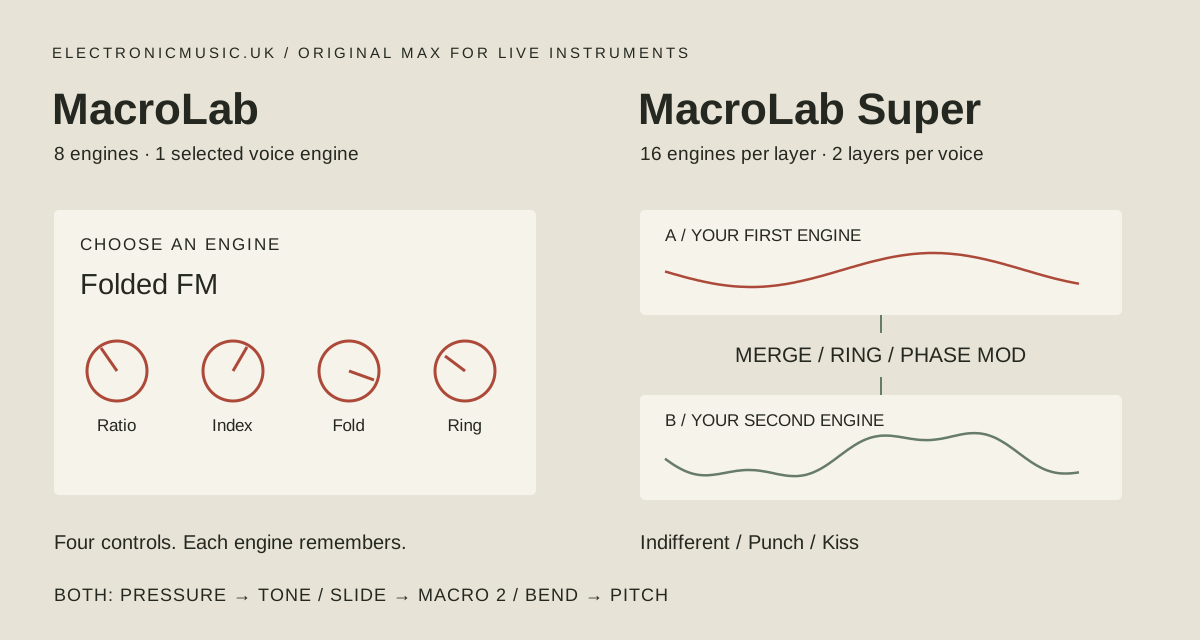
- Eight engines, one selected at a time; eight-note polyphony. Four engine controls plus ADSR, Tone, Drive, Spread and Output. The smaller architecture is the light option; no internal time-based effects.
- MacroLab Super 0.2
- Sixteen engines on each of two layers; one to eight notes. Merge, Ring and Phase Mod; three character modes; two LFOs; resonant tone, chorus, echo and room; 24 factory patches.
“Light” and “heavy” describe the architecture, not a published CPU benchmark. In Super, lower Voices on the Play page if a session is busy. Only sounding voices run oscillator branches; a layer at a Blend endpoint can be skipped unless A is still needed to modulate B.
The engine reference
Macro 1–4 are the four controls beside the selected engine, in left-to-right order. All use a 0–1 range. Each engine retains its own settings when you switch away; Super retains them separately for A and B. Selecting a different controller bank does not select an engine. Engine changes affect held notes too.
The first eight engines are in both instruments. The final eight are Super-only. Open an engine below for the control meanings and a suggested starting direction.
01 / Analog StackMacroLab + Super · Detune / Shape / Sub / Motion
Three drifting, band-limited oscillators; Shape blends saw and pulse.
- 1. Detune
- Separates the oscillator tuning for width and beating.
- 2. Shape
- Blends saw and pulse shapes.
- 3. Sub
- Adds a sine sub while balancing the main stack.
- 4. Motion
- Adds slow pitch and pulse-width movement.
Starting direction: Start with low Detune and Motion for a firm bass; raise both for a moving chord.
02 / Folded FMMacroLab + Super · Ratio / Index / Fold / Ring
Three-oscillator FM, sine folding and a ring-modulated edge.
- 1. Ratio
- Chooses the modulator-to-carrier frequency ratio in steps.
- 2. Index
- Raises FM depth and adds harmonic complexity.
- 3. Fold
- Increases sine folding of the carrier.
- 4. Ring
- Blends in the carrier multiplied by its modulator.
Starting direction: Keep Index and Fold modest, then use slide on Index to open a held note.
03 / Phase TwinsMacroLab + Super · Interval / Phase / Blend / Detune
Two phase-distorted oscillators with a tuned interval and independent balance.
- 1. Interval
- Sets the second oscillator's interval, from an octave below to an octave above.
- 2. Phase
- Increases phase distortion on the two oscillators.
- 3. Blend
- Balances the two oscillator signals inside this engine.
- 4. Detune
- Offsets the second oscillator slightly for beating.
Starting direction: Use a fifth or octave, then balance the voices before increasing Phase. This Blend is separate from Super's layer Blend.
04 / FM StrikeMacroLab + Super · Ratio / Metal / Sweep / Tail
A struck FM voice; its own pitch and index envelopes make drums, bells and bass.
- 1. Ratio
- Sets the modulator ratio.
- 2. Metal
- Controls the initial FM intensity; it falls during the strike.
- 3. Sweep
- Raises the initial pitch excursion and its settling time.
- 4. Tail
- Lengthens the engine's own decay.
Starting direction: Play short low notes for a struck bass; use more Metal and a higher register for bell-like tones.
05 / Harmonic ForgeMacroLab + Super · Spectrum / Oddness / Smash / Motion
Eight weighted partials, moving spectral focus and saturating wave distortion.
- 1. Spectrum
- Moves the emphasis through eight harmonics.
- 2. Oddness
- Reduces even-numbered partials as it rises.
- 3. Smash
- Saturates the additive signal.
- 4. Motion
- Moves the spectral emphasis over time.
Starting direction: Begin with low Smash, hold a chord and move Spectrum slowly; add saturation after finding the harmonic balance.
06 / Vowel LoomMacroLab + Super · Vowel / Formant / Breath / Motion
A harmonic formant bank that moves between open and narrow vowel colours.
- 1. Vowel
- Moves two formant regions towards different vowel colours.
- 2. Formant
- Shifts both formant regions up or down.
- 3. Breath
- Adds a noise component.
- 4. Motion
- Moves the formant shift gently over time.
Starting direction: Try a middle register with modest Breath. These are synthetic formant colours, not recorded speech or a vocal model.
07 / Ring AlloyMacroLab + Super · Ratio / Ring / Edge / Noise
A metallic carrier/modulator pair, with a third overtone and noise attack.
- 1. Ratio
- Sets the modulator frequency relative to the note.
- 2. Ring
- Blends the carrier with its ring-modulated signal.
- 3. Edge
- Adds a third-oscillator phase edge and changes its frequency relationship.
- 4. Noise
- Adds a short noise attack.
Starting direction: Lower Ring to keep the note's centre, then raise it for clang and metallic sidebands.
08 / Glass ModesMacroLab + Super · Material / Brightness / Strike / Tail
Six inharmonic modes with independent decay.
- 1. Material
- Spreads the six modes away from a harmonic series.
- 2. Brightness
- Changes the relative strength of the higher modes.
- 3. Strike
- Increases damping of the higher modes during the strike.
- 4. Tail
- Lengthens the modal decay.
Starting direction: Use low Material for a clearer pitch, then raise it gradually. Strike is a damping control despite its short label.
09 / Sync RazorSuper only · Ratio / Shape / Sweep / Edge
Hard-sync saw/pulse with an internal ratio sweep.
- 1. Ratio
- Sets the synced oscillator's base frequency ratio.
- 2. Shape
- Blends saw/pulse and changes pulse width.
- 3. Sweep
- Adds an internal decaying ratio sweep.
- 4. Edge
- Saturates the synced waveform.
Starting direction: Use the Sweep for a biting onset, then let slide move Shape for a held lead.
10 / Wave TerrainSuper only · Position / Warp / Depth / Motion
Continuous travel through analytic wave landscapes.
- 1. Position
- Moves between two analytically generated wave shapes.
- 2. Warp
- Distorts the first wave's phase.
- 3. Depth
- Changes phase depth in the second wave.
- 4. Motion
- Moves the position over time.
Starting direction: Start with Position near the middle and small Motion. This is an analytic oscillator, not a loader for sampled wavetables.
11 / Sub DivideSuper only · Division / Pulse / Sub / Drive
Clock-divided bass with pulse and sub weight.
- 1. Division
- Selects a divider from 1 through 8 for the low oscillator.
- 2. Pulse
- Changes the root oscillator's pulse width.
- 3. Sub
- Balances divided sine and root pulse.
- 4. Drive
- Saturates the combined signal.
Starting direction: Keep Division low for a bass you can pitch readily; raise it for slower sub relationships.
12 / Chord CloudSuper only · Chord / Colour / Detune / Motion
Four tuned oscillators form moving chord clusters.
- 1. Chord
- Selects major, minor, suspended, root/fifth/octave or added-second interval sets.
- 2. Colour
- Moves the three main oscillators from sine towards saw.
- 3. Detune
- Offsets the upper voices in opposite directions.
- 4. Motion
- Moves the phase of an added octave tone.
Starting direction: Play single notes first: each key already creates a cluster. Small Detune keeps stacked keyboard chords clearer.
13 / Chip CircuitSuper only · Steps / Pulse / Crush / Octave
Stepped waves, pulse width and a blend into an octave-up sine.
- 1. Steps
- Sets the number of amplitude steps in the base wave.
- 2. Pulse
- Adds pulse wave and changes its width.
- 3. Crush
- Reduces the available amplitude levels.
- 4. Octave
- Blends towards a sine one octave above.
Starting direction: Use fewer Steps and more Crush for a rough digital edge. Octave is a blend, not a separate note generator.
14 / String WireSuper only · Damping / Pick / Body / Tail
A noise-excited feedback string with body resonance.
- 1. Damping
- Darkens the string feedback as it rises.
- 2. Pick
- Sets the strength of the short noise excitation.
- 3. Body
- Adds a decaying tonal body component.
- 4. Tail
- Lengthens the feedback decay.
Starting direction: Start with a short Tail and low Body for a dry pluck, then add length. It decays even while you hold a key.
15 / Kick BodySuper only · Sweep / Click / Drive / Tail
Tuned low drum with pitch fall and transient bite.
- 1. Sweep
- Sets the initial pitch fall and its settling time.
- 2. Click
- Adds a brief noise transient.
- 3. Drive
- Saturates the drum body and click.
- 4. Tail
- Lengthens the body decay.
Starting direction: Use a low register and Punch for a compact kick; play higher notes for tuned percussion.
16 / Noise FoundrySuper only · Colour / Metal / Snap / Tail
Filtered noise and metallic oscillators for percussion.
- 1. Colour
- Moves the noise balance from low-pass towards high-pass character.
- 2. Metal
- Blends noise with a metallic oscillator product.
- 3. Snap
- Adds a very short broadband transient.
- 4. Tail
- Lengthens the main noise/metal decay.
Starting direction: Try short Tail for hats and ticks, then add Metal and length for a ringing percussion sound.
Envelope and tail
Attack, Decay, Sustain and Release shape the common amplitude envelope. Times are shown in milliseconds. FM Strike, Glass Modes, String Wire, Kick Body and Noise Foundry also decay inside the engine. A long held key cannot make an internally decaying engine sustain indefinitely. Turn up its Tail, then leave enough shared Release to hear it.
Super: two layers and three interactions
Blend runs from A only at 0 to B only at 1. The two layers each have their own engine and four controls, plus semitone tuning; B also has fine tuning. Cross Mod controls the depth of Ring and Phase Mod. It has no effect in Merge.
- Merge
- A straight blend of the layers. Use it to hear a new pair before adding interaction.
- Ring
- Brings the product of A and B into the merged signal. The effect is strongest near Blend 0.5 and falls away at either endpoint. Cross Mod sets the amount.
- Phase Mod
- A changes B’s carrier phase. Increase Blend towards B to hear it; A can still modulate B at Blend 1. This is one-way A-to-B modulation. Different engines respond differently: string and noise engines show the effect mainly through their tonal components.
Indifferent, Punch and Kiss
Indifferent is the neutral treatment. Punch makes attack, decay and release shorter, lowers sustain slightly, adds drive and a brief transient lift, and reduces chorus and room. Kiss adds a softer attack, darker tone, longer release and more chorus and room. Modes transform the sound without rewriting the stored controls.
Finding the shared controls
- Mix
- Blend, Interaction, Cross Mod, A/B semitones, B cents and Spread.
- Tone
- ADSR, Tone Hz, Resonance and Drive.
- Motion
- A sine LFO and a triangle LFO, each with rate, destination and signed depth. Rates are in Hz, not tempo-synchronised. Macro 1–4 targets move the corresponding controls of both layers. Free keeps the LFOs running; Note restarts both shared LFOs on a new note.
- Play
- Voices, Glide, ordinary/master Bend Range and wheel, touch, velocity and envelope amounts into Tone. Touch Tone is the legacy ordinary-MIDI pressure path; in MPE modes use Expression. One voice uses the same allocator rather than a last-held-note keyboard stack.
- Space
- Chorus, Delay, Delay ms, Feedback, Room, Room Size and Damping. Delay time changes bend pitch. These are shared stereo effects after the voices.
- Expression / MPE Setup
- Per-note mappings and input calibration. Output remains available on every page.
MPE: useful defaults, editable routes
MPE keeps bend, pressure and slide associated with individual notes. It lets you brighten one note in a held chord or bend it against the others. For an external MPE controller, enable MPE for its input in Live’s MIDI settings, keep the track receiving its member channels, and match the controller’s zone and bend range. You can also edit note-expression curves in a MIDI clip. Ableton’s MPE setup and editing guide.
| Gesture | Destination | Amount |
|---|---|---|
| Pressure | Tone | +0.35 |
| Slide / CC74 | Macro 2 | +0.35 |
| Bend | Pitch | +1.00 |
On Folded FM, default slide changes Index. On Analog Stack it changes Shape. On Super, the generic Macro 2 target moves the second control of both selected engines, which may have different meanings. Pressure starts at zero; slide is centred at CC74 value 64. Expression offsets the saved engine settings without overwriting them.
Make a custom mapping
- Open Expression with the Page menu or its named controller bank.
- Choose Pressure To, Slide To or Bend To. Select a destination, or Off.
- Set the corresponding Amount. Positive follows the gesture; negative reverses it. Start small, because destinations are added to the existing settings and can reach their limits.
- Hold two notes and move only one. Save the Set or device preset when the mapping feels right.
Both instruments offer Off, Tone, Macro 1, Macro 2, Macro 3, Macro 4, Drive, Amplitude, Pan and Pitch. Super adds Blend, Cross Mod, A Macro 1–4 and B Macro 1–4. Generic Macro targets affect both layers; A/B targets address just one. These are fixed destination choices, not a learn function for arbitrary Live devices.
Try Pressure → Blend at +0.4, with Blend initially near A. Then try Slide → B Macro 2 at +0.25, so the second layer changes colour under your finger. Or route Pressure → Tone with a negative amount for a sound that becomes darker as you press.
How much does an Amount of 1 change?
At full positive source value, engine macros, Blend and Cross Mod add up to 0.5 to their 0–1 controls; Tone rises up to four octaves; Drive adds 0.5; Amplitude adds up to 80%; Pan adds 0.45 to its 0–1 position. Pressure/slide → Pitch spans two semitones. Bend → Pitch uses the MPE input range. Negative amounts reverse these offsets, and control limits clamp the result.
Slide and bend are bipolar; pressure is unipolar. Multiple routes aimed at the same destination add together. Character, LFOs, envelope and other modulation can also affect the result. These amounts describe the implemented mappings, not a promise of equal perceived loudness or timbre across engines.
Zones and bend calibration
The default is MPE Lower: channel 1 manages member channels 2–16. MPE Upper uses channel 16 as manager with the lower channels as members. MPE Range defaults to ±48 semitones; Bend Range defaults to ±2 for manager-channel or ordinary MIDI bend. Incoming RPN pitch-bend-sensitivity messages are honoured. Match an external controller to the receiving range; avoid changing only one end of the connection.
MacroLab exposes MPE Range and MIDI Mode on Expression, with the ordinary/master Bend Range in its MPE Setup controller bank. Super places MPE Range on Expression and MIDI Mode on its MPE Setup page; its MPE Setup bank groups the calibration controls. Choose MIDI mode for an ordinary keyboard when you want the ordinary bend range. The devices do not advertise support for Live’s external MPE tuning integration.
The built-in eight-control banks
These banks are already defined in the devices for Live control surfaces such as Push. They are separate from user-created Instrument Rack macros.
| Position | MacroLab | MacroLab Super |
|---|---|---|
| 1 | Engine | Character |
| 2 | Tone Hz | Engine A |
| 3 | Drive | Engine B |
| 4 | Spread | Blend |
| 5 | Attack | Cross Mod |
| 6 | Decay | Tone Hz |
| 7 | Release | Release |
| 8 | Output dB | Output dB |
MacroLab has 12 named banks: Perform, Expression, MPE Setup, eight engine banks and Envelope. Every engine bank gives you Engine, that engine’s four controls, Tone Hz, Release and Output dB. The Engine selector is still the control that changes which engine sounds.
Super has 40 banks: Perform; Mix, Tone, Motion, Play, Space, Expression and MPE Setup; then 16 engine banks for A and 16 for B. Each engine bank has its layer’s engine selector, four dedicated engine controls, Blend, Cross Mod and Output dB. Bank navigation depends on the control surface; physical operation on each controller remains a hardware check.
An optional eight-macro performance Rack
For a smaller Super performance view, group the instrument into a Live Instrument Rack and map these eight controls. This is a suggested device-only mapping recipe, not a supplied Rack preset. It lets you keep sound-building controls inside the synth and the most useful performance controls on the Rack.
| Rack name | Super parameter | Suggested range |
|---|---|---|
| Filter | Tone Hz | 200–12,000 Hz |
| Rez | Resonance | 0–0.6 |
| Blend | Blend | 0–1 |
| Cross Mod | Cross Mod | 0–0.6 |
| Tail | Release | 50–4,000 ms |
| Motion | LFO1 Depth | 0–0.4 |
| Drive | Drive | 0–0.5 |
| Level | Output dB | −18–0 dB |
Choose a destination such as Macro 1 for LFO1 before using Motion, and select Ring or Phase Mod before using Cross Mod. Use Live’s Map mode and parameter-unit displays to set the ranges. Tone and envelope controls have curved scaling, so halfway on a Rack macro is not necessarily halfway in milliseconds or hertz. Save the Rack separately when finished.
Rack macros and automation change the shared stored controls; the instrument’s Expression routes operate per note. Mapping a controller’s pressure to an ordinary shared Rack macro does not create a separate macro value for every held note.
Late-night flow: Spew → MacroLab → Shimmer Chops
In Live, place MIDI Spew before either MacroLab instrument in the MIDI chain, and Shimmer Chops after it in the audio chain. Start with a sparse Spew pattern and a longer MacroLab release; bring in Shimmer Chops gradually so its captured, pitched fragments have space around the dry notes. The links open each device’s download and setup entry in the collection.
Factory patches, presets and recall
Super includes 24 factory patches. Selecting a patch name does nothing until you press Load. Loading releases held notes and replaces the sound settings, including unused engines and expression routes. MIDI mode and input bend calibration are retained.
Save edits with the Live Set or as a normal device preset. After reopening, the saved parameters are authoritative: the factory menu is a chooser and can show Init without reloading Init. MacroLab has no factory chooser; its per-engine settings and expression routes also save with Live.
When a sound or gesture surprises you
- No sound
- Check track input, arming/monitoring, clip notes, Output and the amplitude envelope. A decaying engine needs a fresh note. Use Panic for stuck voices; on Super, old effect feedback is muted for two seconds while the dry synth remains playable.
- Bends are too small or too large
- Match the MPE zone and member range, and check the separate ordinary/master range. Try a two-note chord with only one note bent.
- Slide changes the wrong thing
- Check the selected engine’s second control and whether a generic Super target is moving both layers. Select A Macro or B Macro to isolate a layer.
- Cross Mod seems inactive
- Merge does not use it. In Ring, move Blend towards the middle. In Phase Mod, make B audible; some engines have a subtler response.
- A long note dies away
- Internally decaying engines have their own Tail. The shared ADSR alone cannot turn them into a continuous oscillator.
- Bright high notes sound rough
- Strong FM, sync and waveshaping can alias. There is no oversampling. Lower Index/Fold/Edge/Cross Mod, darken Tone, or use a lower register.
What has been checked
For this MPE revision, both MIDI regression suites and 56 native Max audio renders passed at 44.1 kHz. Checks covered the engines, expression destinations, channel reuse, sustain, bend calibration and independent note bending. Both revised devices loaded in Windows Live; custom routes were saved and Super’s mapped performance controls produced the intended parameter changes.
These checks do not establish macOS compatibility, every sample rate, show-length reliability or physical-controller feel. Push transfers were downloaded back and hash-verified; standalone touch performance of this exact revision is still awaiting hands-on feedback. Send useful results with your Live/Max version, controller, MIDI mode and the mapping that caused the problem through the site’s contact form.